
Рисование
| № | Код | Вид в браузере |
|---|---|---|
| 5.3.1 | ||
<Canvas
xmlns="http://schemas.microsoft.com/
client/2007"
xmlns:x="http://schemas.microsoft.com/
winfx/2006/xaml"
Width="150" Height="150"
Background="White"
x:Name="Page">

<Rectangle Width="150"
Height="150" >
    <Rectangle.Fill>
        <LinearGradientBrush>
            <GradientStop Color="red"
Offset="0" />
            <GradientStop Color="yellow"
Offset="1" />
        </LinearGradientBrush>
    </Rectangle.Fill>
</Rectangle>
</Canvas> |
||
| Описание | ||
| Атрибуты Offset с первыми предельными граничными значениями – 0 и 1 | ||
| № | Код | Вид в браузере |
| 5.3.2 | ||
<Canvas
xmlns="http://schemas.microsoft.com/
client/2007"
xmlns:x="http://schemas.microsoft.com/
winfx/2006/xaml"
Width="150" Height="150"
Background="White"
x:Name="Page">

<Rectangle Width="150"
 Height="150" >
   <Rectangle.Fill>
       <LinearGradientBrush>
           <GradientStop Color="red"
Offset="0.2" />
           <GradientStop Color="yellow"
Offset="0.8" />
       </LinearGradientBrush>
   </Rectangle.Fill>
</Rectangle>
</Canvas> |
||
| Описание | ||
| Атрибуты Offset со значениями – 0.2 и 0.8. Хорошо заметны области чистых цветов | ||
| № | Код | Вид в браузере |
| 5.3.3 | ||
<Canvas
xmlns="http://schemas.microsoft.com/
client/2007"
xmlns:x="http://schemas.microsoft.com/
winfx/2006/xaml"
Width="150" Height="150"
Background="White"
x:Name="Page">

<Rectangle Width="150"
Height="150" >
  <Rectangle.Fill>
     <LinearGradientBrush>
         <GradientStop Color="red"
Offset="0.3" />
         <GradientStop Color="yellow"
Offset="0.7" />
      </LinearGradientBrush>
  </Rectangle.Fill>
</Rectangle>
</Canvas> |
||
| Описание | ||
| Атрибуты Offset со значениями – 0.3 и 0.7 | ||
| № | Код | Вид в браузере |
| 5.3.4 | ||
<Canvas
xmlns="http://schemas.microsoft.com/
client/2007"
xmlns:x="http://schemas.microsoft.com/
winfx/2006/xaml"
Width="150" Height="150"
Background="White"
x:Name="Page">

<Rectangle Width="150"
Height="150" >
  <Rectangle.Fill>
   <LinearGradientBrush>
    <GradientStop Color="red"
Offset="0.5" />
      <GradientStop Color="yellow"
Offset="0.5" />
       </LinearGradientBrush>
  </Rectangle.Fill>
</Rectangle>
</Canvas> |
||
| Описание | ||
| Атрибуты Offset со вторыми предельными граничными значениями – 0.5 и 0.5. В этом случае градиент вырождается в две области с чистыми цветами | ||
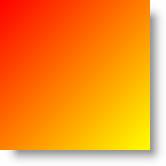

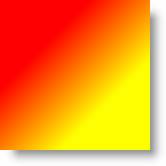
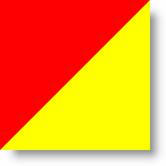
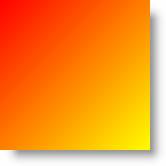
В рассмотренных случаях мы видели направление градиента только в одном направлении – из верхнего левого угла в правый нижний. Для произвольного направления вводится набор атрибутов StartPoint="0,0" EndPoint="1,1" следующим образом:
<Rectangle Width="150" Height="150" >
    <Rectangle.Fill>
        <LinearGradientBrush StartPoint="0,0" EndPoint="1,1">
            <GradientStop Color="red" Offset="0" />
            <GradientStop Color="yellow" Offset="1" />
        </LinearGradientBrush>
    </Rectangle.Fill>
</Rectangle>
В этом случае градиент будет совпадать с направлением, принятым по умолчанию (рис. 5.2):
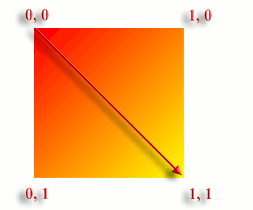
Атрибуты StartPoint="0,0" EndPoint="1,1" задают координаты двух точек, в направлении которых будет направлен градиент. При этом для углов области градиента значения атрибутов определяются указанным на рисунке образом. Можно провести аналогию между этими значениями и обычными координатами – оси направлены совершенно одинаково. В табл. 5.4 приведены различные предельные случаи направления градиента.
| № | Код | Вид в браузере |
|---|---|---|
| 5.4.1 | ||
<Canvas
xmlns="http://schemas.microsoft.com/
client/2007"
xmlns:x="http://schemas.microsoft.com/
winfx/2006/xaml"
Width="150" Height="150"
Background="White"
x:Name="Page">

<Rectangle Width="150"
Height="150" >
 <Rectangle.Fill>
  <LinearGradientBrush StartPoint="0,0"
EndPoint="1,1">
   <GradientStop Color="red"
Offset="0" />
    <GradientStop Color="yellow"
Offset="1" />
     </LinearGradientBrush>
  </Rectangle.Fill>
</Rectangle>
</Canvas> |
||
| Описание | ||
| Направление градиента из верхнего левого в правый нижний угол. Совпадает с принятым по умолчанию | ||
| № | Код | Вид в браузере |
| 5.4.2 | ||
<Canvas
xmlns="http://schemas.microsoft.com/client/2007"
xmlns:x="http://schemas.microsoft.com/winfx/2006/xaml"
Width="150" Height="150"
Background="White"
x:Name="Page">

<Rectangle Width="150"
Height="150" >
    <Rectangle.Fill>
        <LinearGradientBrush StartPoint="0,0"
EndPoint="1,0">
            <GradientStop Color="red"
Offset="0" />
            <GradientStop Color="yellow"
Offset="1" />
        </LinearGradientBrush>
    </Rectangle.Fill>
</Rectangle>
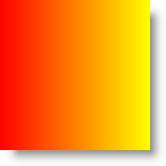
</Canvas> |
||
| Описание | ||
| Направление градиента слева направо | ||
| № | Код | Вид в браузере |
| 5.4.3 | ||
<Canvas
xmlns="http://schemas.microsoft.com/
client/2007"
xmlns:x="http://schemas.microsoft.com/
winfx/2006/xaml"
Width="150" Height="150"
Background="White"
x:Name="Page">

<Rectangle Width="150"
Height="150" >
    <Rectangle.Fill>
        <LinearGradientBrush StartPoint="0,0"
EndPoint="0,1">
            <GradientStop Color="red"
Offset="0" />
            <GradientStop Color="yellow"
Offset="1" />
        </LinearGradientBrush>
    </Rectangle.Fill>
</Rectangle>
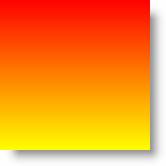
</Canvas> |
||
| Описание | ||
| Направление градиента сверху вниз | ||
| № | Код | Вид в браузере |
| 5.4.4 | ||
<Canvas
xmlns="http://schemas.microsoft.com/
client/2007"
xmlns:x="http://schemas.microsoft.com/
winfx/2006/xaml"
Width="150" Height="150"
Background="White"
x:Name="Page">

<Rectangle Width="150"
Height="150" >
    <Rectangle.Fill>
        <LinearGradientBrush StartPoint="1,0"
EndPoint="0,0">
            <GradientStop Color="red"
Offset="0" />
            <GradientStop Color="yellow"
Offset="1" />
        </LinearGradientBrush>
    </Rectangle.Fill>
</Rectangle>
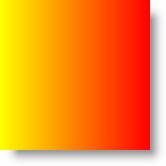
</Canvas> |
||
| Описание | ||
| Направление градиента справа налево. В принципе, такое же расположение можно получить, если поменять местами цвета градиента | ||
| № | Код | Вид в браузере |
| 5.4.5 | ||
<Canvas
xmlns="http://schemas.microsoft.com/
client/2007"
xmlns:x="http://schemas.microsoft.com/
winfx/2006/xaml"
Width="150" Height="150"
Background="White"
x:Name="Page">

<Rectangle Width="150"
Height="150" >
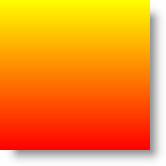
    <Rectangle.Fill>
        <LinearGradientBrush StartPoint="0,1"
EndPoint="0,0">
            <GradientStop Color="red"
Offset="0" />
            <GradientStop Color="yellow"
Offset="1" />
        </LinearGradientBrush>
    </Rectangle.Fill>
</Rectangle>
</Canvas> |
||
| Описание | ||
| Направление градиента снизу вверх | ||
Для других, промежуточных значений, можно изменять значения атрибутов в диапазоне от 0 до 1.
Внутри определения градиента можно помещать несколько цветов:
<LinearGradientBrush>
   <GradientStop Color="Blue" Offset="0" />
   <GradientStop Color="Red" Offset="0.2" />
       <GradientStop Color="Orange" Offset="0.3" />
   <GradientStop Color="Yellow" Offset="0.4" />
      <GradientStop Color="Green" Offset="0.5" />
   <GradientStop Color="DeepSkyBlue" Offset="0.6" />
      <GradientStop Color="Blue" Offset="0.7" />
  <GradientStop Color="Purple" Offset="0.8" />
      <GradientStop Color="White" Offset="1" />
        </LinearGradientBrush>